
 LeasePoint Apply
The buyer is asked for information without knowing how it relates to the transaction.
LeasePoint Apply
Turn equipment interest into a clear, secure application path.
Apply gives business buyers one guided place to provide the information needed for a transaction, understand why each step matters, and see what happens next. When a question needs a person, Funding Concierge is within reach.
Submitting an application starts LeasePoint's review. It does not guarantee approval, terms, equipment eligibility, or funding.
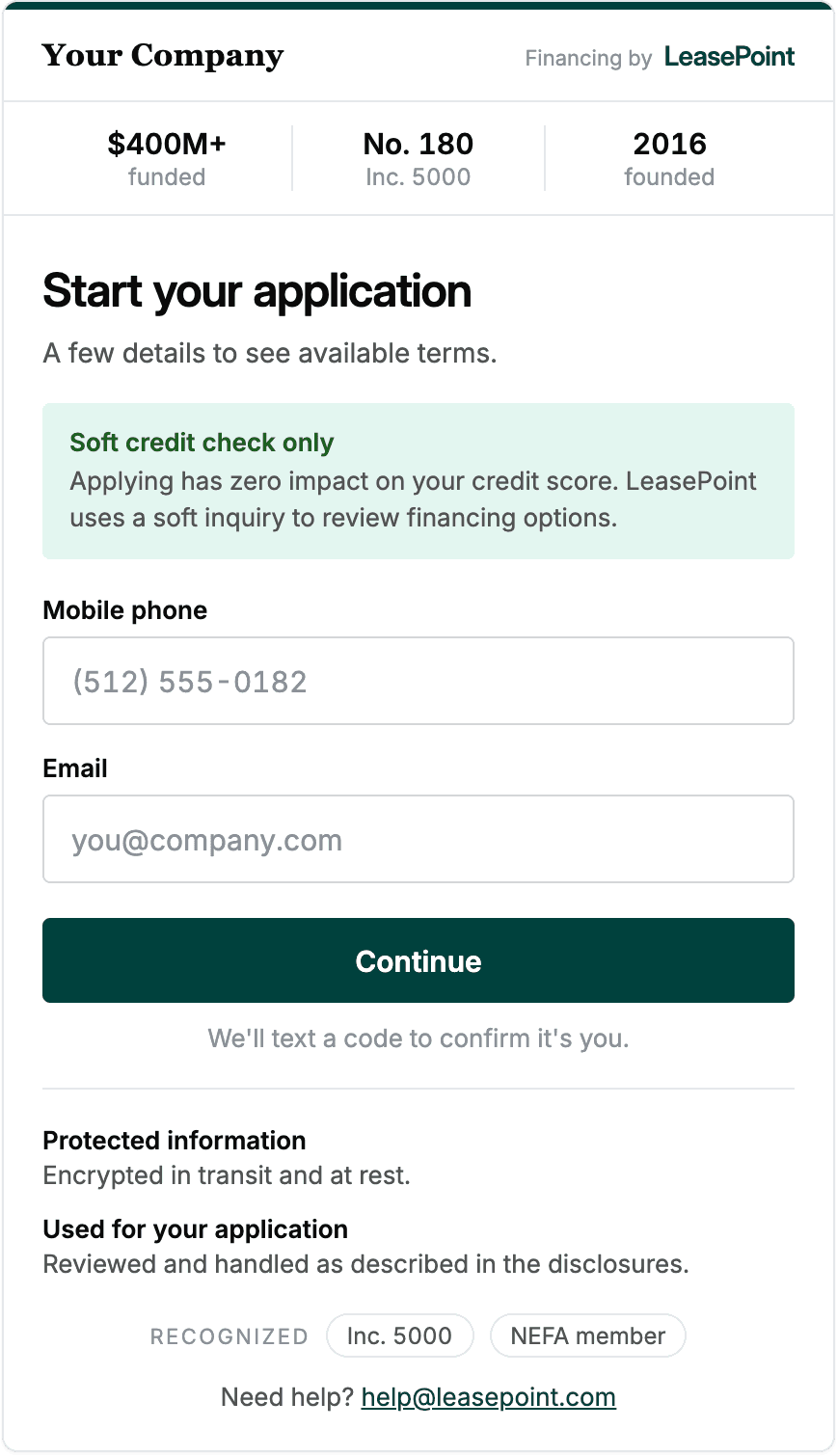
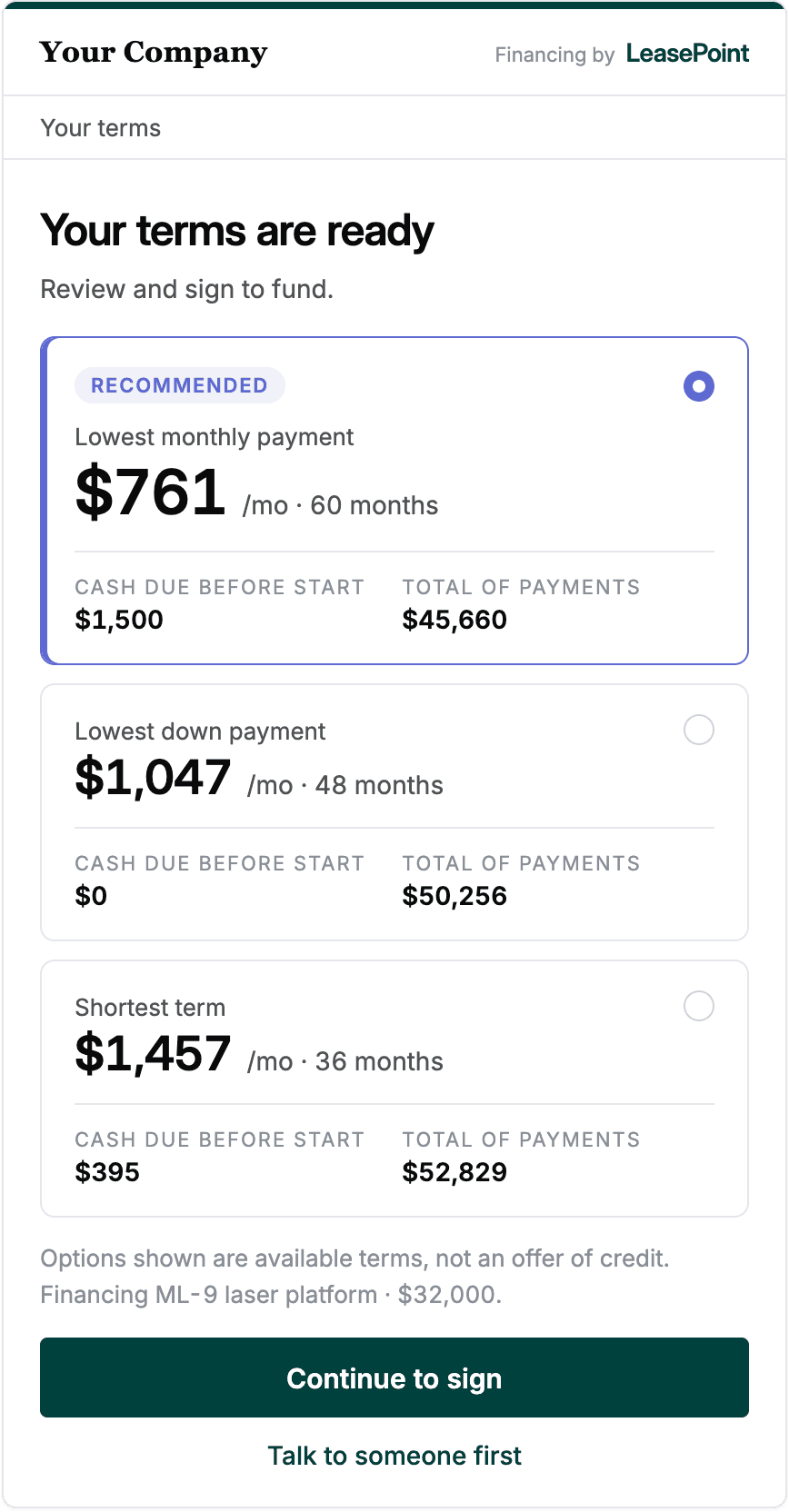
Product marketing rendering. Screen details and availability may vary by program and release.
The handoff moment
Interest can disappear when the next step feels unclear.
A buyer may be ready to move forward and still pause when the application feels disconnected from the equipment conversation. Apply is designed to keep the buyer oriented from the first request through the next responsible step.
A long, undifferentiated form makes the process feel harder than the next task.
The buyer does not know whether to contact the vendor or LeasePoint.
A completed form can feel like a black box without a visible next action.
Designed for clarity
Know what to complete and what happens next.
One current step
Keep attention on the task the buyer can complete now while showing where it sits in the journey.
One clear reason
Explain in plain language why important information is being requested.
One visible next action
Show what LeasePoint is doing, what the buyer may need to do, and where to get help.
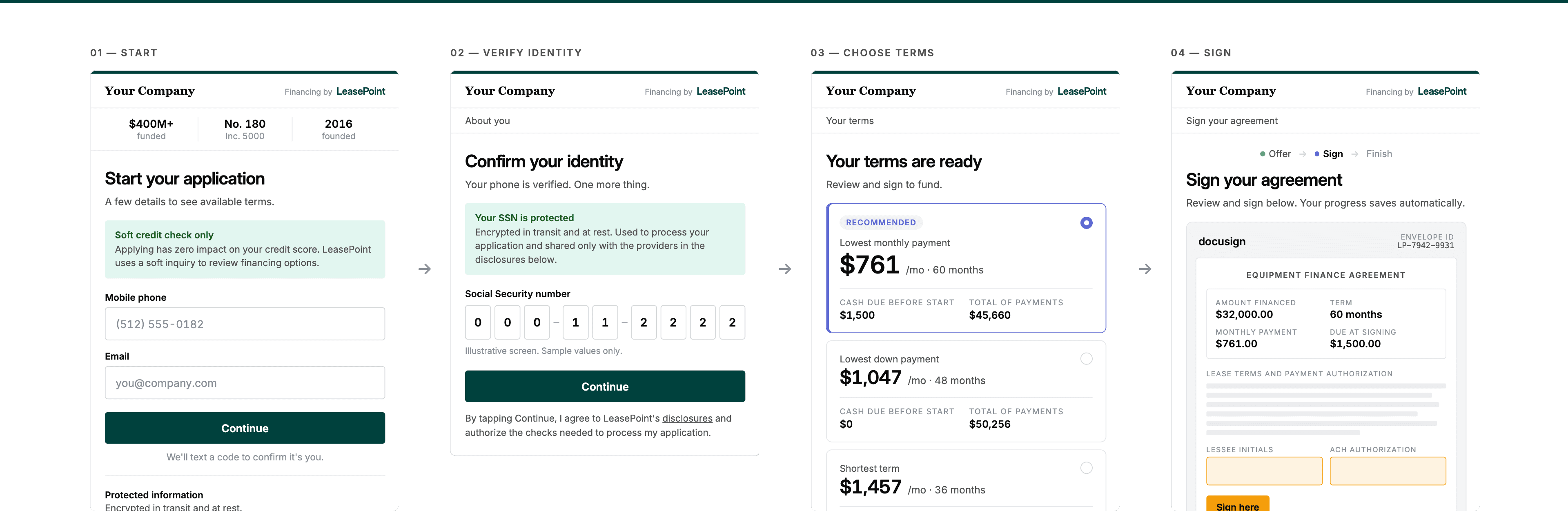
Experience the handoff
See how Apply keeps the buyer oriented.
Explore a representative workflow. The example does not collect information, run credit, submit an application, or create an account.
A focused first step
Product marketing renderings. Exact screens, inputs, permissions, and availability depend on the approved program and product release.
A guided journey
The path adapts to the transaction. The principles stay consistent.
Invitation or direct start
The buyer enters through an approved vendor invitation or LeasePoint application route.
Request confirmation
The buyer confirms the business, equipment, and request context.
Applicable information
Apply requests the information needed for the specific review path.
Submission and review
Submission starts review. Additional questions or information may be required.
Next path
When information or an option is available, the buyer receives the applicable next steps.
Progress and support
The buyer sees progress updates, any action needed, and how to contact Funding Concierge.
Privacy, security, and information boundaries
Information should follow the transaction, not spill across roles.
Apply separates the buyer's secure application experience from the limited coordination view available to an approved vendor user.
Equipment and program basics
Approved business labels, equipment context, referral attribution, and process guidance may support the handoff.
Milestones and assigned actions
Current stage, owner, and permitted next steps follow the participant's approved role.
Applicant and decision information
Personal identifiers, credit information, banking details, documents, and underwriting material stay in approved secure systems.
May use or show when approved
- Information requested from the buyer
- Why a request is being made
- Current transaction update
- Action assigned to the buyer
- Applicable documents or requirements
- A route to Funding Concierge
Keep outside this role by default
- Consumer credit information in vendor views
- Personal identifiers not required for the vendor role
- Internal underwriting notes
- Approval probability or lender decision logic
- Restricted pricing and program economics
- The applicant's unrestricted file
Value for the team
Every step should show who owns the action.
Business buyer
Provide accurate information, complete assigned items, and ask when a request is unclear.
LeasePoint
Review the application, explain information requests, and tell the buyer what happens next.
Equipment vendor
Make a responsible introduction, support vendor-owned items, and avoid interpreting credit.
Funding Concierge
Explain the process, clarify requests, and coordinate the appropriate next step.
What Apply does not promise
A clearer application is not a guaranteed outcome.
Apply improves orientation and secure routing. It does not change the transaction's review requirements or move accountable decisions into the interface.
- Submitting is not approval
- Displayed examples are not available terms
- Every buyer may not see the same questions
- A credit inquiry type is not universally promised
- Equipment eligibility remains transaction-specific
- Documentation and funding conditions may still apply
For vendor teams
Put Apply inside a LeasePoint vendor program.
Map the buyer invitation, vendor-owned handoff, permitted visibility, Funding Concierge support, and accountable review path before launch.
- Seller introduction
- Buyer applications
- Permitted Partner milestone
The vendor supports the equipment sale. LeasePoint and accountable finance teams own the review.
Start a programConnected by responsible handoffs
Apply is where the buyer enters. The rest of the system keeps each role aligned.

Signal
Guide the seller with approved context and one responsible next action.
Explore SignalApply
Give the buyer a clear, secure route to provide applicable information.
Current page
Partner
Share relevant transaction updates and follow-up tasks.
Explore Partner
Funding Concierge
Bring in a person when a question needs explanation, coordination, or judgment.
Explore Funding ConciergeEquipment finance focusBuilt around commercial equipment sales
Role-based viewsUseful context follows responsibility
Human supportFunding Concierge remains in the workflow
Program configuredAvailability follows the approved scope
Frequently asked questions
Understand Apply before you map the workflow.
What is LeasePoint Apply?
Apply is LeasePoint's secure business-buyer application experience. It shows what is needed, why it is needed, and what happens next for the applicable transaction path.
Does submitting Apply mean I am approved?
No. Submission starts LeasePoint's review. Approval, available options, terms, documentation, equipment eligibility, and funding remain subject to applicable requirements.
Will every buyer see the same questions?
Not necessarily. Information and documentation can vary by business, ownership, equipment, amount, program, and transaction circumstances.
Does Apply always use a soft credit inquiry?
Check the credit inquiry disclosure in your application. It explains the process and asks for any required authorization before you continue.
What can my equipment vendor see?
Approved vendor users can see relevant transaction updates and follow-up tasks in Partner. Your personal, credit, and underwriting information remains restricted.
Can I save my progress?
Save and return options vary by application. Follow the instructions in your application, or contact LeasePoint before leaving if you are unsure how to return.
What if I need help?
Use the Funding Concierge path shown in the application for process questions. Sensitive information and documents should remain inside the approved secure workflow.
How long does the process take?
Timing varies by transaction, program, information completeness, documentation, review requirements, and other parties involved.
Ready to apply?
Start your business equipment financing application.
Use the secure LeasePoint application to provide information for review. Submission does not guarantee approval, terms, or funding.